
_Kindi
A modern 2-billion-parameter language model at 20+ tokens per second, on a 2014 NVIDIA Quadro K420 with 1 GB of memory. About 7x faster than llama.cpp on the same card, and token-for-token identical to it.
Get it on GitHub Read the manual Watch on YouTubegeneration, exact mode
llama.cpp on the same card
24,576-token context
GitHubLive on a K420
Recorded live: the pi coding agent, with a Kindi colour theme, driving kindi serve on one Quadro K420 at default settings, each task in a fresh session. It runs nvidia-smi, writes and runs a Python script and checks disk space. Token streaming is real time; pauses longer than 2.5 seconds are shortened. Watch the full, untrimmed recording (123 seconds).
Benchmarks
| Quadro K420, Ternary-Bonsai-2-2B | Generation | Prompt reading |
|---|---|---|
| llama.cpp (Vulkan), all layers on the GPU | 2.84 | 2.99 |
| Earlier CuPy engine | 3.73 | – |
| Kindi 0.1.0, exact head | 20.8 | 26.5 |
| Kindi 0.1.0, fast head | 22.9 | 26.5 |
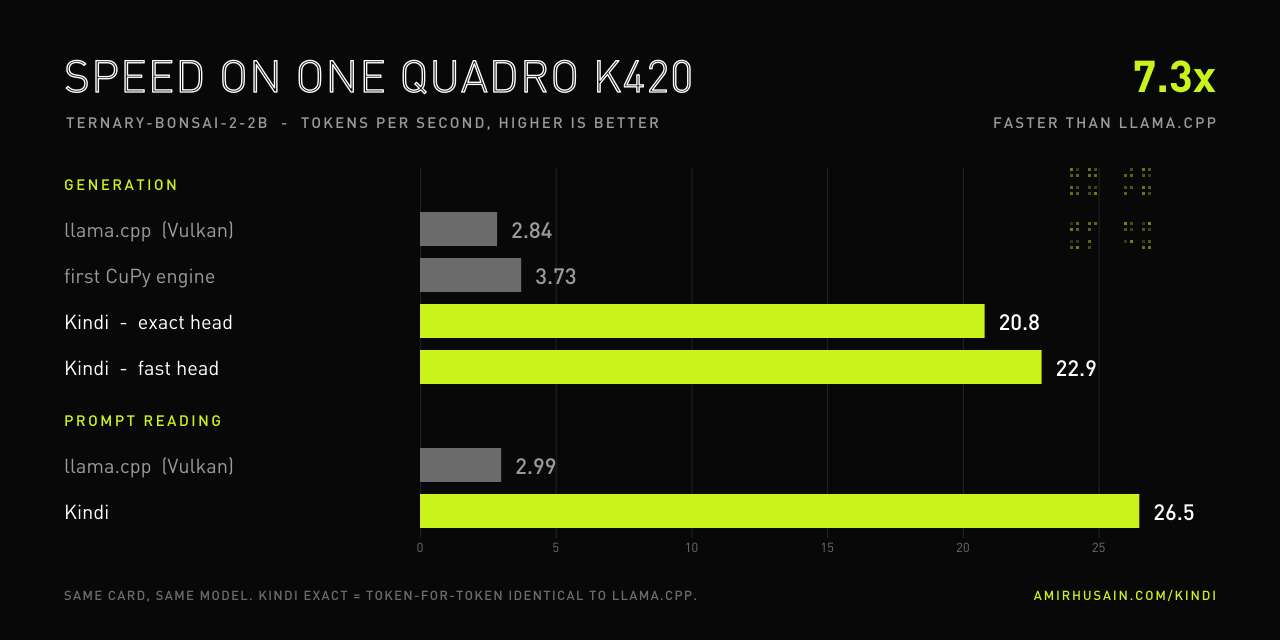
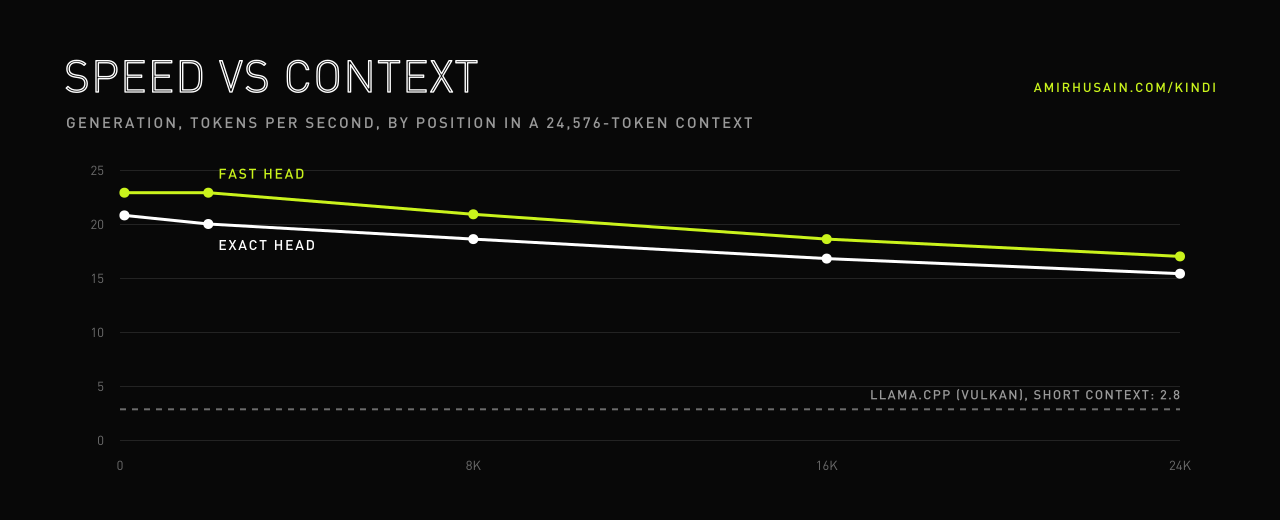
Same machine, same card, same model. We looked for any published result of a modern language model on a K420 and found none; to our knowledge this is the fastest way to run one.
Agent benchmark
How useful is a 2B model as a working agent? We wrote 56 programming and terminal tasks, each with a hidden test, and ran them with the pi coding agent, plus 158 short text jobs such as spam, sentiment and escalation checks. The tasks, the tests, a runner for Kindi or any OpenAI-compatible server, and our results are open, so you can measure your own setup.
Field manual
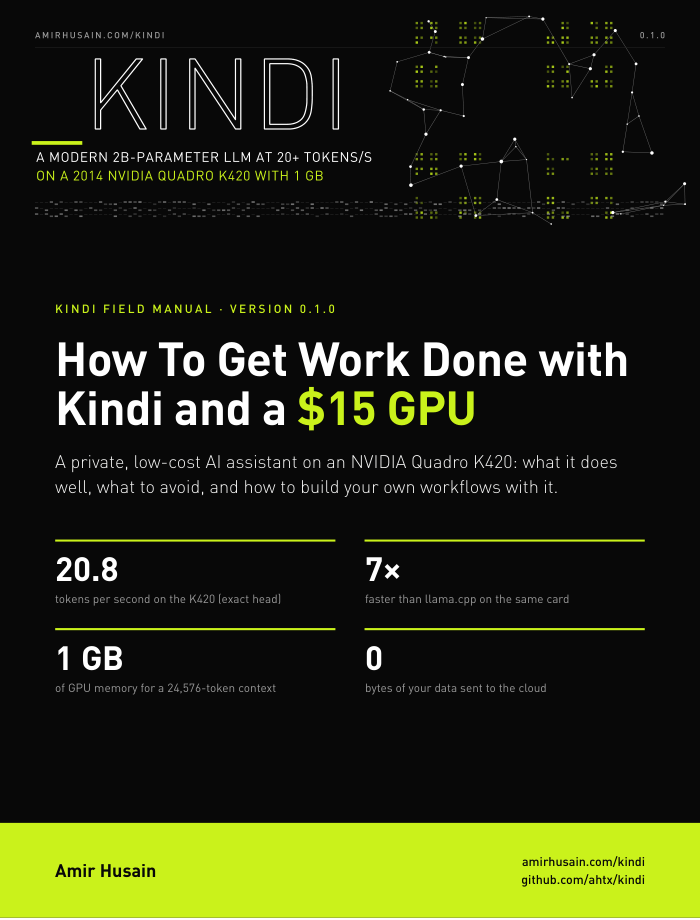
How To Get Work Done with Kindi and a $15 GPU
A practical guide to the pi agent, the Bonsai 2 2B model and Kindi on a Quadro K420: which jobs work, which jobs to avoid, how to break a big job into steps, and how to build your own workflows. Every number in it comes from the benchmark, and every screenshot is a live session on the card.
What you get
OpenAI-compatible
kindi serve speaks /v1/chat/completions with streaming and tool calls. Chat apps, scripts and coding agents work unchanged, and nothing leaves the machine.
Exact by default
Greedy output matches llama.cpp token for token on the same model file. kindi verify proves it on your card in under a minute.
Built for agents
Checkpoints, parked conversations and saved openings mean an agent's 5,000-token system prompt is read once, not on every turn, even across restarts.
A real model
Prism ML's Ternary-Bonsai-2-2B: the Qwen3.5-2B architecture with ternary weights, tool calling, code and 24,576 tokens of context, Apache 2.0.
Fast head on request
One command switches to a clustered shortlist output head: about 15 % faster, 99.4 % the same tokens, no restart.
Small and self-contained
One Python package and one CUDA file. Convert, verify, serve: three commands, and a Docker image for the CUDA 10.2 stack Kepler needs.
Try it
Install and run
# 1. the model (430 MB, Apache 2.0)
mkdir -p ~/.kindi && cd ~/.kindi
wget https://huggingface.co/prism-ml/Ternary-Bonsai-2-2B-gguf/resolve/main/Ternary-Bonsai-2-2B-PTQ1_0.gguf
# 2. convert once, check against llama.cpp, serve
K="docker run --rm --gpus all -u $(id -u):$(id -g) -v $HOME/.kindi:/data kindi:0.1.0"
$K convert /data/Ternary-Bonsai-2-2B-PTQ1_0.gguf
$K verify
ALL PASS: token-exact with llama.cpp
docker run -d --name kindi --gpus all -u $(id -u):$(id -g) \
    -p 127.0.0.1:8093:8093 -v $HOME/.kindi:/data kindi:0.1.0
Use it
# any OpenAI client
from openai import OpenAI
client = OpenAI(base_url="http://localhost:8093/v1", api_key="none")
r = client.chat.completions.create(model="bonsai2-2b",
        messages=[{"role": "user", "content": "Write a bash one-liner that counts .txt files"}])
print(r.choices[0].message.content)
ls *.txt | wc -l
Kindi is free software under the AGPL-3.0. Individuals, researchers and anyone porting it to other GPUs can use, change and share it at no cost. Commercial licenses are available for closed products and hosted services: get in touch.
How it works
No unpacking
Ternary weights are never unpacked: four weights are one byte that indexes a table of precomputed partial sums, one shared-memory read per four weights.
No collisions
Every lane of a warp owns its tables, laid out in its own memory bank, so no two threads ever collide - and one byte-permute instruction turns a weight byte into its table address.
Fractal tables
Each table is built level by level as three shifted copies of the level below: the ternary construction of the Cantor set, 27 additions with no division.
Fused everything
Norms, the Hadamard rotation folded into the weights, SiLU gates and attention are fused; fp64 sums keep it exact; the K/V cache is fp16 so 24,576 tokens fit in 1 GB.
The story
Why an engine for a ten-year-old graphics card? Because careful engineering still beats bigger hardware. I talk about Kindi, ternary models and the Quadro K420 on my channel.
Watch the launch video Deep Tech with Amir on YouTube All software